Local models (llama.cpp and MLX)
korTTY can run local language models directly through integrated, model-specific sidecar servers: GGUF models through the pinned llama.cpp llama-server on every platform, and — on Apple Silicon Macs — MLX models through the official mlx-lm server. You do not need LM Studio, Ollama, or a cloud inference account for local chat, text, coding, translation, and embedding workloads.
Open AI > AI Manager and use these tabs:
- Local Models installs, imports, configures, starts, stops, and removes local model registrations (GGUF everywhere, additionally MLX on Apple Silicon).
- Local AI assigns profiles to the Text/translation, Coding and AI agent profile roles and to the session journal's AI summaries (Profile roles), selects the RAG embedding model and records the llama.cpp runtime-update policy and preferred backend (Local runtime), and stores an optional Hugging Face token (Hugging Face).
- Profiles creates an Integrated llama.cpp or Integrated MLX (Apple Silicon) profile for an installed model and controls its prompt optimization preset.
Every action button in the tab carries a matching glyph (install, wizard, import, configure, set as default, start, stop, remove, refresh, search, load more, download, pause, cancel), and the pause control switches between pause and resume glyphs during a download.
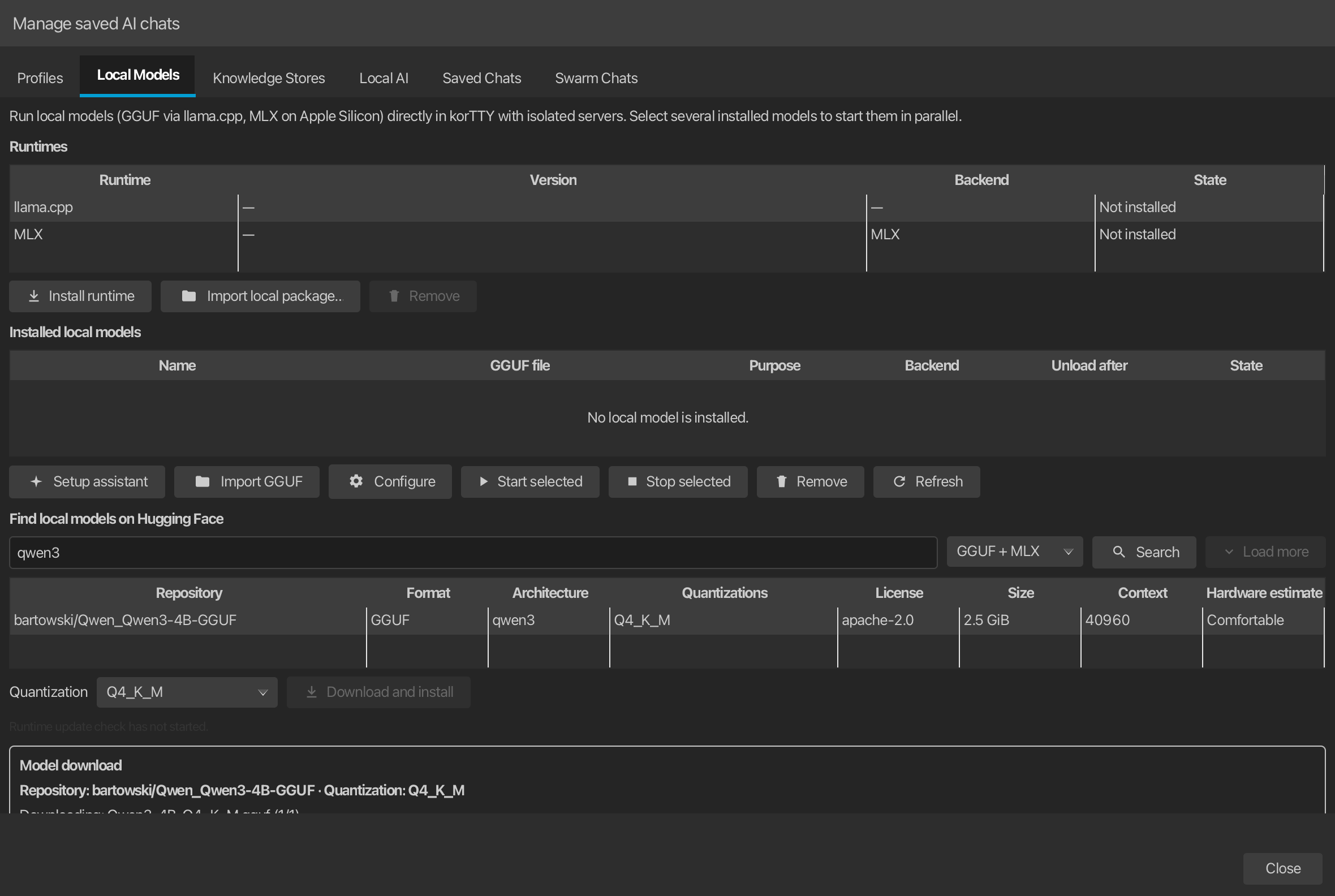
Runtimes
The Runtimes table at the top of Local Models lists both embedded runtimes with their installed version, backend, and state (Ready, Not installed, or Revoked): the llama.cpp runtime (every platform) and, on Apple Silicon, the MLX runtime. The backend is the GPU or CPU backend the runtime computes on, not the runtime's name: MLX always runs on Metal, and llama.cpp shows the backend of its installed package. Before a runtime is installed, the column shows the backend an installation would bring, with the note "on install" after it; for llama.cpp that follows the Preferred runtime backend setting, where Auto means Metal on macOS and CPU on Windows and Linux. Three actions operate on the selected row:
- Install runtime or Check/install runtime update downloads, verifies, and activates the newest compatible package from the signed stable channel — the llama.cpp index for the llama row, the
mlx-stableindex for the MLX row. - Import local package… installs a runtime package file (
.zip) without downloading it, for example on an air-gapped machine. The file is accepted only when its SHA-256 matches a non-revoked entry of the Ed25519-signed stable index for the current platform; anything not published by the signed channel is refused. The verified package then runs through exactly the same installation machinery as a download (extraction hardening, health/sanity check, idle-only activation). - Remove deletes the selected runtime after confirmation. Sidecars must be idle; installed models stay registered but cannot start until a runtime is installed again, and the revocation denylist survives removal so a withdrawn package remains blocked even across reinstalls.
Storage and network access
Model inference stays on this computer. korTTY contacts Hugging Face only when you search for or download a model that you approve. Public repositories work without a token; an optional token for private or gated repositories is encrypted with the master password. Official builds can also fetch the separately signed model/prompt catalog over HTTPS in the background; no prompt, source document, or model weight is sent with that request.
Quick setup assistant
Select AI > AI Manager > Local Models > Setup assistant. The six-step assistant covers privacy, detected system memory and backend guidance, optional role-specific recommendations, license and exact download-size review, verified installation, and a final readiness summary.
On Choose models for optional roles, enable any combination of Text and translation, Coding, and RAG embeddings. Every enabled slot has its own recommendation selector that lists every catalog model the detected memory supports for that role, ordered by preference with the preferred default preselected — a real choice, not a single fixed suggestion. Disabled slots are left unchanged. Text and Coding may deliberately share one compatible recommendation, in which case korTTY downloads and registers that GGUF only once. Opening the assistant from a missing-embedding warning preselects only the RAG-embedding slot.
The built-in bootstrap catalog uses conservative RAM tiers. The table shows the preselected default per role; the selector of an enabled slot additionally offers every other catalog model whose memory requirement the detected tier meets:
| Detected memory | Text recommendation | Coding recommendation | RAG embeddings |
|---|---|---|---|
| Less than 16 GiB | Qwen3 1.7B, Q4_K_M |
Qwen3 1.7B, Q4_K_M |
Qwen3-Embedding 0.6B, Q8_0 |
| 16–23 GiB | Qwen3 4B, Q4_K_M |
Qwen2.5-Coder 7B Instruct, Q4_K_M |
Qwen3-Embedding 0.6B, Q8_0 |
| 24 GiB or more | Qwen3 8B, Q4_K_M |
Qwen2.5-Coder 7B Instruct, Q4_K_M |
Qwen3-Embedding 0.6B, Q8_0 |
For the RAG-embeddings slot, Qwen3-Embedding 0.6B Q8_0 remains the preselected default on every tier; the selector also offers Qwen3-Embedding 4B Q4_K_M (from 16 GiB), Qwen3-Embedding 8B Q4_K_M (from 24 GiB), and — without a minimum memory requirement — the multilingual BGE-M3 Q8_0 and the very small, fast Nomic Embed Text v1.5 Q8_0.
Recommendations are starting points, not hardware guarantees. The model table labels the estimated fit as Comfortable, Possible, Too large, or Unknown; context size and simultaneous models also affect memory use.
Before Install becomes available, korTTY loads each selected repository at the catalog's fixed revision in the background, verifies that the requested quantization exists, and displays the pinned repository, license, and exact combined GGUF download size. You must review and accept those values. A mutable repository revision or missing quantization stops the assistant before any download starts.
Runtime installation, GGUF downloads, verification, registration, and function tests run asynchronously so the JavaFX dialog remains responsive. The progress view names the current model and phase; Cancel installation stops at a safe boundary and retains resumable .part files, while Retry restarts a failed or cancelled run from the verified selections.
A new local chat model starts with a 32,768-token runtime context, or with the Hub-reported context length when the model was trained for less; an embedding model starts with 4,096 tokens. A large context needs considerably more RAM/VRAM: if a model fails to load, lower its context under Configure or with the Context window of an Integrated llama.cpp profile.
After every selected GGUF is downloaded and registered, the assistant sends a real local chat-completion request or, for an embedding-only model, a real embedding request through the installed runtime. Only after all tests pass does it atomically save the selected Text/Coding profile IDs and RAG embedding-model ID in global-settings.xml; it creates a reusable Local: … embedded profile when a selected chat model has none and makes the first such profile the default only when no default exists. A failed test does not produce a successful finish page or persist partially updated role assignments.
Signed model and prompt catalog
korTTY always contains a small bootstrap catalog with the memory-tier recommendations and prompt-family detection needed for offline setup. All nine bundled model recommendations carry a concrete 40-character Hugging Face commit, so even the bootstrap never resolves a mutable repository head when the assistant later fetches metadata or GGUF files. Official builds can update those data independently from the application through model-prompt-catalog-v1.json and its detached Ed25519 signature model-prompt-catalog-v1.sig.
On the first use of recommendations or automatic prompt detection, korTTY immediately loads the last signature-verified cache and performs at most one background refresh from the fixed HTTPS stable channel. The catalog can update recommended model IDs, fixed revisions, quantizations, roles, RAM thresholds and ordering, plus the mapping from model-name tokens to built-in prompt presets. It cannot inject arbitrary executable code or replace korTTY's built-in action, safety, JSON, or code-output contracts.
The exact catalog bytes are verified before strict schema-v1 parsing, and unknown schema fields are rejected. A failed download, invalid signature, or invalid catalog leaves the last valid cache untouched. If the application build has no valid catalog public trust root, korTTY performs no catalog network request, does not trust an existing cache, and uses only the built-in bootstrap.
Each catalog also carries a positive monotonic sequence. During refresh, korTTY rejects a signed catalog whose sequence is older than the last accepted cache or bootstrap, and rejects an equal-sequence catalog with a different version. A newly accepted catalog with the highest sequence must be written to the atomic cache before it becomes active; the protected promotion workflow separately requires every official sequence to be strictly greater than the sequence in the latest published release, preventing a correctly signed older catalog from replaying obsolete recommendations.
Find and download models
The Hugging Face browser searches model repositories and shows repository, format, architecture, available quantizations, license, selected-quantization size, context length, publication age, and a hardware estimate. The Age column reflects when the repository was first published on the Hub — shown as today, days, months, or years, and — when the Hub does not report a creation date. On Apple Silicon a Format selector next to the search field switches between GGUF + MLX (default), GGUF, and MLX; each enabled format keeps its own cursor pagination, and the Format column identifies every row. Other platforms search GGUF only.
Click a column header to sort the results by that column — a second click reverses the direction, and the header shows the active sort arrow. Size, context and age sort numerically (repositories without a reported creation date sort last), and the hardware estimate sorts from best to worst fit; the chosen order persists while background metadata loads complete.
Only repositories this computer can actually run appear: korTTY completes the lightweight search listing with exact per-file metadata in the background and hides rows whose size is unknown or whose smallest quantization exceeds the detected memory. The status line reports how many usable repositories are shown and how many were hidden. Selecting a row loads exact metadata for that repository's immutable revision and shows Loading… while Size and Hardware estimate refresh; the chosen quantization remains selected. Projector, quantization-matrix, and speculative-decoding helper GGUFs are excluded from the downloadable language-model choices. Load more continues the same search without discarding earlier results. Select a repository and quantization, review its license and size, then choose Download and install.
korTTY installs only an immutable 40-character repository revision with exact file metadata. After you confirm the license and download size, a fixed Model download panel at the bottom identifies the repository and quantization, the current file and multipart shard, transferred and total bytes, elapsed time, transfer rate, and estimated remaining time. Its full-width progress bar and Pause/Resume and Cancel controls remain available while you continue to review the manager. Downloads use .part files, free-space checks, HTTP Range and If-Range, content-digest verification (SHA-256 for LFS files, the git blob hash for small in-tree files), and multipart shard ordering. Cancellation, including closing the AI Manager during a transfer, keeps the partial data needed for a later resume. An unpinned repository or a missing file digest is rejected instead of silently installing mutable content.
An MLX repository is downloaded as one complete directory (safetensors weights, tokenizer, and configuration files); its quantization is a repository-level property such as 4BIT or 8BIT, so the quantization selector shows exactly one entry. If no MLX runtime is installed yet, korTTY asks whether to download and register the model anyway — it can be started as soon as the runtime is installed.
MLX models on Apple Silicon
On Apple Silicon Macs (macOS 14 or newer), korTTY additionally runs MLX models — Apple's array framework for machine learning on Apple GPUs — through the official mlx-lm server. The mlx-community organization on Hugging Face publishes thousands of ready-converted models.
- Registration and lifecycle mirror GGUF models: installed MLX models appear in the same table with backend Metal, support Start selected, Stop selected, Remove, and Configure (display name and unload-after idle time), and report the same runtime states.
- Isolation mirrors llama.cpp: every model runs as its own loopback-only sidecar with a random port and a generated per-process API key. korTTY wraps
mlx_lm.server— which has no authentication of its own — in its own launcher that rejects every unauthenticated request except the local health probe, forces offline Hugging Face access, strips inherited Python and token environment overrides, and exits after the configured idle time. - The MLX runtime package is separate from both the application installer and the llama.cpp runtime: a pinned relocatable CPython plus a hash-locked
mlx-lmwheel set, built in CI and published through the same Ed25519-signed index mechanism as the llama.cpp packages and resolved through the same latest release. Install, update, locally import, or remove it in the Runtimes table; without an installed MLX runtime, MLX models stay registered but cannot start. - Profiles: choose Integrated MLX (Apple Silicon) as the profile connection and select the installed model from the Local MLX model list. LM-Studio-MCP internet modes are not available for embedded profiles; the korTTY web-search tool works normally.
- Reasoning models (for example Qwen3 conversions) are handled like their GGUF counterparts: korTTY separates the inline chain-of-thought from the answer and retries a reply that contains only reasoning once automatically (except for the dedicated snippet/workflow diagram request, which fails immediately instead).
Import existing GGUF files
Select Import GGUF, choose one or more .gguf files, and then choose one mode:
| Mode | Behavior |
|---|---|
| Managed copy | Copies the GGUF into korTTY's model directory using a temporary file and atomic activation where the filesystem supports it. |
| External reference | Registers the original path. Moving or deleting that file makes the model unavailable; removing the registration never deletes the external file. |
A compatible, verified llama-server runtime must also be installed. Runtime packages live separately under ~/.kortty/llm/runtime/ and are not part of the base application installer. When you download or import the first model, korTTY offers to install the matching signed stable runtime before continuing; you can also choose Install runtime in Local Models. The model manager does not accept an arbitrary executable as a replacement for the verified package.
Configure and run models
The installed-models table also carries an Age column: the model's upstream publication date, captured once at install time. Models installed before this column existed and manually imported GGUF files have no captured date and show —.
Select an installed model and choose Configure. The available settings are deliberately typed and bounded; arbitrary server arguments are not accepted. Saving first asks the runtime manager to stop the model. If that model is processing a request, korTTY refuses the change and leaves both the running sidecar and persisted configuration untouched; retry after the request finishes.
| Setting | Values | Default |
|---|---|---|
| Backend | Auto, CPU, Metal, Vulkan | Auto |
| Context size | 512–2,097,152 tokens; also set from an Integrated llama.cpp profile’s Context window in AI Manager > Profiles | 32,768 for a chat model (less when it was trained for less), 4,096 for an embedding model |
| CPU threads | 0–1,024; 0 means automatic |
Automatic |
| GPU layers | -1–10,000; -1 means automatic |
Automatic |
| Unload after | 1–1,440 minutes, or Never | 10 minutes |
The per-model backend describes how that model should run. In AI Manager > Local AI > Local runtime, Preferred runtime backend controls which signed native package is installed and updated: macOS offers Auto, CPU, and Metal; Windows/Linux offer Auto, CPU, and Vulkan. Automatic (keep active backend) preserves the already active backend during updates. For a first installation, Auto prefers Metal and falls back to CPU on macOS; on Windows and Linux it prefers CPU and falls back to Vulkan only when no compatible CPU package is published. An explicitly selected backend requires an exact compatible package and never changes to another backend silently.
Use multi-selection and Start selected to load several different models concurrently. Profiles that point to the same installed model and runtime configuration share one authenticated sidecar. The table reports STOPPED, STARTING, LOADING, READY, BUSY, SLEEPING, or FAILED.
You can mark one installed model as the default with Set as default in the action bar or the table's right-click menu; Clear default in the same menu removes the mark. The default model is shown with a leading ★ in the Name column and is pre-selected when the manager opens, so the Start/Configure/Stop actions target it by default. This is a convenience marker for the manager only — it does not change which AI profile the agent, chat, or other AI features use; those continue to follow the AI profile configuration.
If a selected Metal or Vulkan model requires a different package from the active runtime, korTTY offers to download, verify, and activate the matching signed package without interrupting current requests. It asks the same when you Configure a model and save it with Metal or Vulkan while another package is active, because the model's backend alone does not change the package: a Vulkan model on the CPU package runs on the CPU. Declining keeps the active package and says so in the status line. Models that require incompatible GPU runtimes must be started separately with the matching preferred backend.
While such a mismatch lasts, the Backend column shows both values, for example Vulkan (runtime: CPU). A model that a chat or agent request starts on a non-matching package still runs, and korTTY writes a warning naming both backends to kortty.log.
After the configured idle time, llama.cpp releases the model tensors from RAM/VRAM and korTTY marks the model as sleeping while retaining the lightweight process. The next request acquires a runtime lease and wakes the model automatically. Stop selected terminates only idle sidecars; an active generation is never interrupted by model removal or a normal stop request.
To make this activity visible, korTTY records the request and model lifecycle in kortty.log (under the log directory configured in Configuration > Global Settings > Logging, default ~/.kortty/logs). Every AI request logs one AI request sent line and a matching AI request done / AI request failed line with the action, provider, model, the reasoning level the request actually uses (reasoningEffort=), approximate input size, duration and token count — metadata only, never the prompt or response text. Local models additionally log when a model is Loaded, Unloaded … (sleeping) after the idle timeout, or Unloaded … sidecar stopped, for both the llama.cpp and MLX runtimes. These lines and the AI request sent and AI request done lines are INFO; a failed request is logged as a WARN line.
Errors reported by the model itself are logged too, so a failing request can be diagnosed from the log alone:
AI request failedcarries the server's own error text (itserror.message, or the raw response body when it is not JSON) and appends| caused by: …for each nested message, which is what distinguishes a rejected request parameter from an unloaded model or an unreachable endpoint.- A connection test that the model refuses logs the reason as
Embedded llama.cpp connection test failedorEmbedded MLX connection test failed; previously the caller only saw a failed test with no explanation. - When the reasoning level stored in the profile is not one the model offers, korTTY logs a warning naming the configured level, the level used instead and the levels actually available, and then sends the request at the substitute level. Without that line the request would silently run at a different level than the AI Manager shows.
- A local sidecar that fails to start or exits unexpectedly logs the tail of its own server log, so the runtime's error output ends up in
kortty.logas well.
Text, coding, translation, and embedding roles
In AI Manager > Local AI > Profile roles, choose separate profiles for Text and translation, Coding and AI agent profile. Leaving a choice at Use default AI profile preserves the normal fallback. The same section also holds a Session journal profile selector used only for the session journal's AI summaries — the Text/Coding roles do not apply there; leave it on the default profile unless the journal should run on a different model. Terminal summarization, problem solving, questions, descriptions, and translation use the Text role; snippet generation, completion, analysis, security fixes, and workflow generation use the Coding role. Terminal AI agent runs use the AI agent profile role, which falls back to the Coding role when it is left empty.
Profile resolution follows the most specific available choice: an explicitly selected profile, then a security-specific profile or connection profile where applicable, then the Text/Coding role, then the default profile. A terminal agent run takes the profile chosen in its setup dialog or named in the agent command first, then the connection's own AI profile, then the AI agent profile role, then the Coding role, then the default profile. The same role mechanism works with embedded, remote HTTP, or local CLI profiles; a role does not force a local model.
Dynamic UI translation can use a translation profile of the kind AI translation under Configuration > Global Settings > Translation. With its AI profile left on Default, this path sends the translation request to the assigned embedded Text profile and does not require a translation-provider API key.
The RAG embedding model ID identifies the installed local model used to vectorize knowledge-store documents and searches. Use a dedicated embedding GGUF rather than a chat model unless that model explicitly supports the embeddings route and the configured vector dimensions.
Prompt optimization
Each AI profile has a Prompt optimization preset. Auto (model detection) uses the verified catalog's model-name mapping, whose bootstrap recognizes Qwen, DeepSeek, Mistral/Mixtral, Gemma, Phi, GPT-OSS, and Llama names; Generic adds no family-specific guidance. You can also force any family preset when a model name is unusual.
Presets add short compatibility instructions after korTTY's action contract and AI Skills while preserving the existing strict JSON, code-payload, and safety requirements. GGUF chat templates themselves remain llama.cpp's responsibility. The preset asks supported models to return only the requested final format and to keep reasoning traces out of JSON/code responses.
Runtime isolation and updates
Every loaded configuration starts llama-server on 127.0.0.1 with a random port and a generated per-process API key. korTTY passes a fixed model path, removes inherited LLAMA_ARG_* and Hugging Face token overrides, and starts the pinned server with offline mode plus its web UI, agent, UI MCP proxy, and slot endpoint disabled. Chat and embeddings use authenticated OpenAI-compatible local routes.
Chat sidecars keep the server's default reasoning parsing, which correctly handles both <think>-style reasoning models (whose chain-of-thought is returned separately) and channel/harmony models such as gpt-oss (which require that parsing to produce a final answer at all). The pinned server can still occasionally answer a whole reply with an HTTP 500 (“does not match the expected … format”) when a reply parses ambiguously; korTTY retries a local server error, an empty reply, or a reasoning-only reply once automatically before reporting it (for the dedicated snippet/workflow diagram request, only a server error is retried), and defensively strips any reasoning markers that leak into the content.
The runtime build is independent of the application installer. gradle/llama-cpp-pins.properties pins the upstream llama.cpp tag, full commit, and source-archive SHA-256 (plus the history of shipped pins), while build.gradle.kts keeps the API-contract version and korTTY package revision. The korTTY repository detects candidates and validates its source-side native matrix but holds no publication token or runtime signing key. The public korTTY llama.cpp runtime channel owns explicit human-dispatched stable publication: it rebuilds the reviewed source commit, runs authentication, chat/completion, embeddings, JSON-schema, sleep/wake, and parallel-sidecar smoke tests on every package plus a separate Qdrant contract, and publishes immutable descriptors with its own scoped github.token only after entering the protected signing environment. CUDA is not a v1 backend.
The update format uses the detached Ed25519 signature runtime-index-v1.sig over the exact bytes of runtime-index-v1.json. Each entry binds the runtime ID, upstream tag and commit, API-contract version, minimum korTTY version, platform, architecture, backend, compressed size, SHA-256, HTTPS URL, executable path, and revocation status. The public verification key is auditable at config/trust/llama-runtime-ed25519-public.pem and embedded in normal local and release builds; an optional CI or Gradle override must match that pinned identity exactly. A missing or invalid trust root, mismatched override, index signature, package size, or package hash stops the operation before untrusted code is activated.
A package is installed beside the active version and checked locally with a bounded llama-server --version launch before activation. Activation and the atomic rebinding of registered models occur only while all local inference is idle. The candidate then remains pending first launch until a real GGUF-backed server reaches its authenticated API: success promotes it into the healthy history, while that first real startup failing restores the newest non-revoked previous runtime, rebinds affected models, removes the failed package, and restarts runtime management. The two newest healthy installations are retained, and a package staged during active work is retried after the requests finish. Release CI performs the deeper authenticated chat, embedding, JSON-schema, sleep/wake, and parallel-sidecar contract tests before publication.
A verified index withdrawal is enforced immediately for Notify me and Install stable updates automatically checks. korTTY first persists the revoked runtime/installation IDs in a durable denylist and writes a package-local quarantine marker, then clears the active pointer, stops its sidecars, removes revoked versions from rollback history, and replaces affected model bindings with a non-executable marker. Both the runtime installer and every new process launch consult those guards, so an interrupted cleanup or stale models.xml entry cannot restart the withdrawn executable. Local AI remains blocked until a compatible signed replacement is installed; the main window and Local Models status identify the revoked runtime and whether a verified replacement is available. Off performs no network check, so it cannot learn about a newly published withdrawal until the user explicitly checks or enables signed-index checks.
The MLX runtime (Apple Silicon) has no per-model quarantine marker because MLX models bind to a model directory rather than to the runtime; its enforcement clears the active pointer, stops every MLX sidecar, and records the withdrawn id in a durable denylist so it can never be reinstalled or reactivated. Registered MLX models stay registered but cannot start until a non-revoked MLX runtime is installed.
The single Runtime updates (llama.cpp & MLX) choice controls the automatic check started with korTTY and whenever the preference is saved, and applies to both embedded runtimes:
| Policy | Startup behavior |
|---|---|
| Off | Performs no runtime-update network request for either runtime. Non-revoked installed runtimes remain usable, while every withdrawal already persisted locally stays enforced. |
| Notify me (default) | Verifies each installed runtime's signed stable index and shows a notification when a compatible update for an installed runtime is available (llama.cpp and, on Apple Silicon, MLX), without automatically installing it. Without an installed runtime no popup appears; the available package is still listed in Local Models. A verified withdrawal of either runtime is enforced immediately. |
| Install stable updates automatically | Downloads, verifies, installs, and activates a compatible stable package for each runtime, including a safe replacement for a withdrawn active version; a busy runtime defers its update instead of interrupting an active request. |
The Runtimes table in Local Models shows the installed version and state per runtime. The action button reads Install runtime when the selected runtime has no verified package and Check/install runtime update otherwise, and checks/installs the stable channel even when the stored automatic policy is Off or Notify me. Runtime candidates are discovered by a weekly workflow, but promotion remains a deliberate, reviewed release action rather than adopting every upstream tag automatically.
Other version… switches the selected runtime to any version the signed stable channel still offers for this computer — typically back to an older one when a newer runtime causes problems. The list marks the newest, the active, and the pinned version; revoked versions are never listed. Choosing a version other than the newest pins it: update checks keep that version under every policy, while withdrawals are still enforced, and the Runtimes table shows Pinned with the version. Choosing the newest version, Unpin, or Check/install runtime update follows the stable channel again. If the signed channel revokes a pinned version, korTTY drops the pin so a safe runtime can be installed. A llama.cpp version switch goes through the same health check, idle-only activation, and pending first launch as an update; MLX keeps only the active version on disk, so switching back downloads the verified package again.
Files and backup behavior
| Path | Purpose | Included in a korTTY backup? |
|---|---|---|
~/.kortty/global-settings.xml |
Embedded profiles, Text/Coding assignments, embedding model ID, runtime backend/update policy, encrypted Hugging Face token | Yes |
~/.kortty/llm/models.xml |
Local GGUF model registrations and typed runtime settings | Yes |
~/.kortty/llm/mlx-models.json |
Local MLX model registrations (Apple Silicon) | Yes |
~/.kortty/llm/models/ |
Managed GGUF weights | No; download or copy them again |
~/.kortty/llm/mlx/models/ |
Managed MLX model directories | No; download them again |
~/.kortty/llm/mlx/runtime/ |
Regenerable MLX runtime packages (pinned CPython + mlx-lm) | No; reinstall a compatible package |
~/.kortty/llm/runtime/ |
Regenerable llama.cpp packages and active-package metadata | No; reinstall a compatible package |
~/.kortty/llm/catalog/last-valid-catalog-v1.json |
Regenerable signature-verified model/prompt catalog cache | No; korTTY reverts to the bootstrap and refreshes it again |
~/.kortty/llm/run/ |
Temporary sidecar keys and logs | No |
Troubleshooting
- No llama.cpp runtime is installed
- Open AI > AI Manager > Local Models and choose Install runtime, or accept the installation prompt when downloading or importing a model. korTTY downloads the matching signed stable package; the application installer intentionally does not contain a native runtime.
- A signed runtime check or installation fails
- Confirm that this korTTY build contains the official runtime-channel public key, that HTTPS access to the stable index and package is available, and that the platform/backend combination is published. korTTY fails closed instead of bypassing a missing trust root, invalid signature, checksum mismatch, incompatible API contract, or runtime quarantine. The runtime update coordinator records the complete failure cause and stack trace in
kortty.logunder the log directory configured in Configuration > Global Settings > Logging (default~/.kortty/logs), even when the manager shows a shorter status message. - The update check cannot reach the runtime channel
- A machine that is offline, behind a captive portal, or whose link is not up yet reports no failure: the startup check ends with the message that the signed runtime channel could not be reached, already installed runtimes stay usable, every withdrawal already persisted locally stays enforced, and the check simply runs again at the next application start or when the update policy is saved again. An unreachable channel is recorded as a single informational line in
kortty.lograther than as a failure with a stack trace, because an unreachable server says nothing about korTTY's own state. An installation you start yourself still reports the unreachable channel in the Local Models status, so a deliberate action never fails silently. - The runtime is reported as revoked
- Open AI > AI Manager > Local Models and install the offered verified replacement. Do not remove the package marker or edit
models.xml: the durable denylist still blocks the installation, and revoked versions are deliberately ineligible for rollback or reinstallation. If no compatible replacement is listed, local AI stays unavailable until the stable channel publishes one for this platform/backend. - A new runtime version causes problems
- Select the runtime in AI > AI Manager > Local Models, choose Other version…, and install the previous version. It stays pinned, so update checks do not upgrade it again; choose the newest version or Unpin once a fixed release is available.
- Install runtime ends with an error dialog about the health check
- Before a downloaded runtime is activated, korTTY runs
llama-server --versiononce. When that fails, the package is removed again and an error dialog names the reason: the exit code, the Windows loader status it stands for (for example0xC0000135, a DLL the runtime needs is missing), and the start of the program's output. The same line is written tokortty.log. A missing DLL or library points at a faulty package rather than at your computer: report the message, and try another version with Other version… in the meantime. - A new runtime rolls back on its first model start
- The lightweight
--versioncheck passed, but the first real GGUF-backed authenticated API start failed. korTTY restores the newest healthy non-revoked package when available and the Local Models status reports that the replacement runtime failed its health check; inspect the Local Models error, model/backend compatibility, and memory settings before trying the update again. - A model remains in
FAILED - Verify that the GGUF and executable still exist, that the executable is runnable, and that the chosen backend is available on this computer. Reduce context size or simultaneous models when system or GPU memory is insufficient.
- An MLX model cannot start
- MLX requires an Apple Silicon Mac with macOS 14 or newer and an installed korTTY MLX runtime package under
~/.kortty/llm/mlx/runtime/. Registered MLX models stay listed without the runtime but report the missing-runtime message when started. The runtime package is published through the signed runtime channel; developers can build an unsigned local package withscripts/build-mlx-runtime-local.sh. - The setup function test fails after installation
- The GGUF remains registered so you can inspect it. Confirm that the matching signed runtime backend is active, reduce the model context or GPU layers if memory is tight, and retry by starting the model. Embedding tests additionally require readable GGUF embedding-dimension metadata.
- A gated Hugging Face repository returns an authorization error
- Accept the repository terms on Hugging Face, unlock the korTTY master-password vault, and save an authorized token under AI Manager > Local AI > Hugging Face. The token is sent only to the trusted Hugging Face host, not to redirected storage hosts.
- A download cannot resume
- If the repository's ETag or immutable file metadata changed, korTTY restarts that file instead of appending incompatible bytes. A checksum mismatch deletes the invalid partial file.
Further reading
- llama.cpp — the inference engine behind korTTY's GGUF sidecars, including the
llama-serverdocumentation. - GGUF format specification — the single-file model format used by llama.cpp, and llama.cpp's quantization overview explaining labels such as
Q4_K_M. - Apple MLX and mlx-lm — Apple's machine-learning framework for Apple Silicon and its official language-model server used by korTTY's MLX sidecars.
- Hugging Face Hub documentation — repositories, revisions, gated models, and access tokens; MLX conversions are collected under mlx-community.